
Showing posts with label track. Show all posts
Showing posts with label track. Show all posts
2016-07-22
Inside Kdenlive Projects: Individual Tracks
Inside Kdenlive Projects: Timeline Tracks
Tagged as ...
inside,
Inside Kdenlive,
Kdenlive,
timeline,
timeline tracks,
track,
XML

Inside Kdenlive Projects: The Analyzer
Tagged as ...
analyzer,
audio mix,
Inside Kdenlive,
Kdenlive,
project,
project bin,
timeline,
timeline tracks,
track,
transition,
XML,
XSLT
2016-07-13
Kdenlive UI: Resizable Timeline Track Headers & Small Tracks -- Odds and Ends
Tagged as ...
Kdenlive,
timeline,
track,
track header,
UI improvement
2016-05-03
Kdenlive UI: Track Status LED -- Odds and Ends
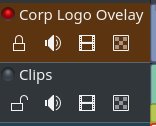 As part of the new advanced timeline editing operations that have been landed in the development branch, Kdenlive now has new track status indicators. Each track got its own little signal LED. It can either be unlit, or red, yellow, or green. But what does this status actually signal...?
Tagged as ...
audio target track,
Kdenlive,
LED,
timeline,
track
2016-01-31
Transition Tricks in Kdenlive
Tagged as ...
Kdenlive,
track,
transition
Subscribe to:
Posts (Atom)